
Fiber Internet vs. Cable Internet: A Side-by-Side Look at Performance and Reliability

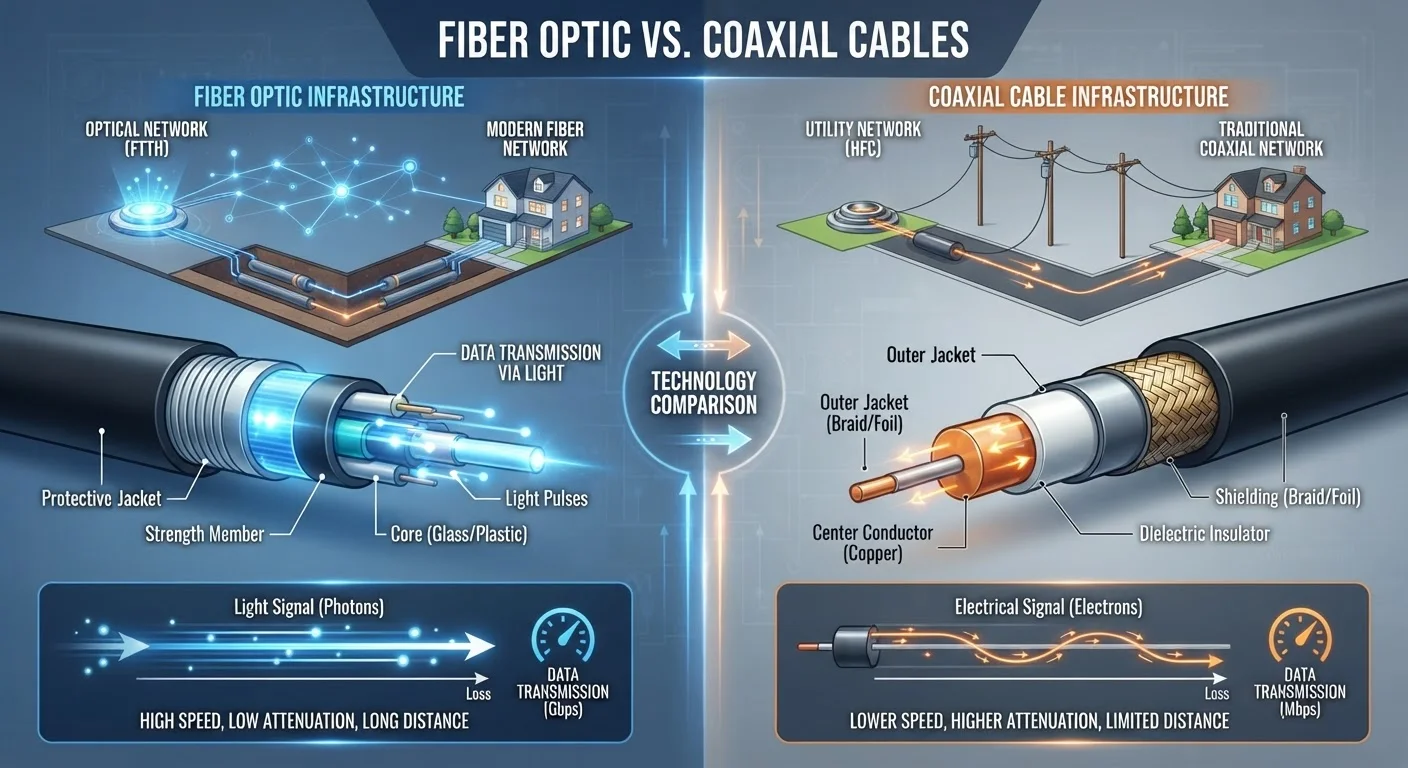
Photo: TrendingResults.net | Discover More, Trend More editorial
Key Takeaways
- Fiber uses light signals through glass strands; cable uses electrical signals through coaxial copper lines.
- Fiber typically offers symmetrical upload and download speeds; cable upload speeds are usually much slower.
- Cable networks are shared among neighbors, which can cause congestion during peak hours; fiber connections are less susceptible to this.
- Fiber availability is still limited geographically, making cable the only wired broadband option in many areas.
- Latency is generally lower and more stable on fiber, which matters for video calls, gaming, and real-time applications.
How Each Technology Actually Works
The difference between fiber and cable internet starts at the physical layer - the actual wires running to your home.
Fiber internet transmits data as pulses of light through thin strands of glass or plastic (optical fiber). Because light travels with virtually no electrical resistance and isn't affected by electromagnetic interference, fiber can carry enormous amounts of data over long distances with minimal signal loss.
Cable internet uses the same coaxial copper infrastructure originally built for cable television. It transmits data as electrical signals, which degrade over distance and are susceptible to interference. Most cable networks use a protocol called DOCSIS (Data Over Cable Service Interface Specification) to deliver broadband over that existing infrastructure. DOCSIS 3.1, the current widespread standard, can theoretically reach multi-gigabit speeds, though real-world performance is influenced by network architecture and local demand.
Understanding this distinction matters because it directly shapes the reliability, speed ceiling, and consistency of your connection - not just the headline number your ISP advertises. For a deeper look at what ISP marketing language actually means, see our breakdown of common speed myths.
Speed, Symmetry, and Latency: Where the Gap Is Real
Both technologies can deliver fast download speeds - but the similarities largely end there.
Upload Speed
Cable internet is designed asymmetrically: the network allocates far more bandwidth to downloading than uploading. A cable plan advertised at 500 Mbps download might offer only 20-50 Mbps upload. Fiber plans, by contrast, are commonly symmetrical - 500 Mbps down and 500 Mbps up. This gap is especially consequential for remote workers, streamers, and anyone on frequent video calls. Upload speed matters more than most people realize, and cable's asymmetric design is one of its most significant practical limitations.
Latency
Latency - the time it takes a data packet to travel from your device to a server and back - is typically lower on fiber. Where cable connections often see 15-35 ms of latency under normal conditions, fiber frequently measures under 10 ms. For gaming, video conferencing, and real-time applications, even small latency differences are perceptible. A speed test's ping and jitter readings reveal latency quality that raw download numbers never show.
| Criterion | Fiber Internet | Cable Internet |
|---|---|---|
| Transmission medium | Light pulses through glass/plastic fiber | Electrical signals through coaxial copper |
| Typical download speeds | 200 Mbps - 5 Gbps | 100 Mbps - 1.2 Gbps |
| Typical upload speeds | Symmetrical (matches download) | Much lower (often 10-50 Mbps) |
| Typical latency | Under 10 ms | 15-35 ms |
| Peak-hour congestion risk | Low | Moderate to high |
| Nationwide availability | Limited; growing but patchy | Broad; reaches most U.S. households |
| Infrastructure age | Newer; purpose-built for data | Adapted from legacy TV cabling |
Consistency and Congestion: The Peak-Hours Problem
One of cable internet's structural challenges is network sharing. Coaxial cable infrastructure in most neighborhoods is a shared medium - your connection competes for bandwidth with nearby subscribers. During evenings and weekends, when many households are online simultaneously, cable speeds can drop noticeably.
Fiber networks are generally point-to-point or use passive optical network (PON) architecture that is far less susceptible to neighborhood congestion. Each subscriber's signal is isolated, so a neighbor's 4K streaming marathon is unlikely to degrade your connection.
~43%
U.S. households with access to fiber broadband
According to FCC broadband deployment data, fiber availability has grown substantially but still leaves the majority of U.S. addresses reliant on cable or other technologies.
10-35 ms
Typical latency range difference between fiber and cable
Network performance testing consistently shows fiber connections achieving lower and more stable latency figures compared to cable under equivalent load conditions.
This consistency gap is why many users who switch from cable to fiber report that their average experienced speed improves even when the advertised plan speed is similar. If you want to understand what realistic speed your household actually needs before choosing a tier, our household speed guide walks through the calculation.
Availability, Infrastructure, and What to Expect
The most important practical constraint on this comparison is availability. Cable internet reaches the vast majority of American households - it piggybacked on decades of existing cable TV infrastructure. Fiber deployment, while expanding aggressively, remains concentrated in urban and suburban markets. Rural and exurban areas often have no fiber option at all.
If fiber is available at your address, the choice becomes a straightforward performance evaluation. If it isn't, cable is likely your most capable wired broadband option - and for download-heavy households, it can perform adequately. For those in areas with neither option, satellite internet has improved but comes with its own tradeoffs, particularly on latency.
DOCSIS 3.1 and Multi-Gig Cable
Even after you've chosen a connection type, performance inside your home depends heavily on your router, wiring, and setup. If you're still experiencing slow speeds after switching plans, the culprit is often inside the home rather than at the infrastructure level.
The content on this site is provided for informational purposes only and should not be considered a substitute for professional advice. While we strive to provide accurate and up-to-date information, we make no guarantees regarding its completeness or accuracy. Always consult a qualified professional for advice specific to your circumstances before making any decisions.