
Broadband Types Decoded: DSL, Cable, Fiber, and Fixed Wireless Explained

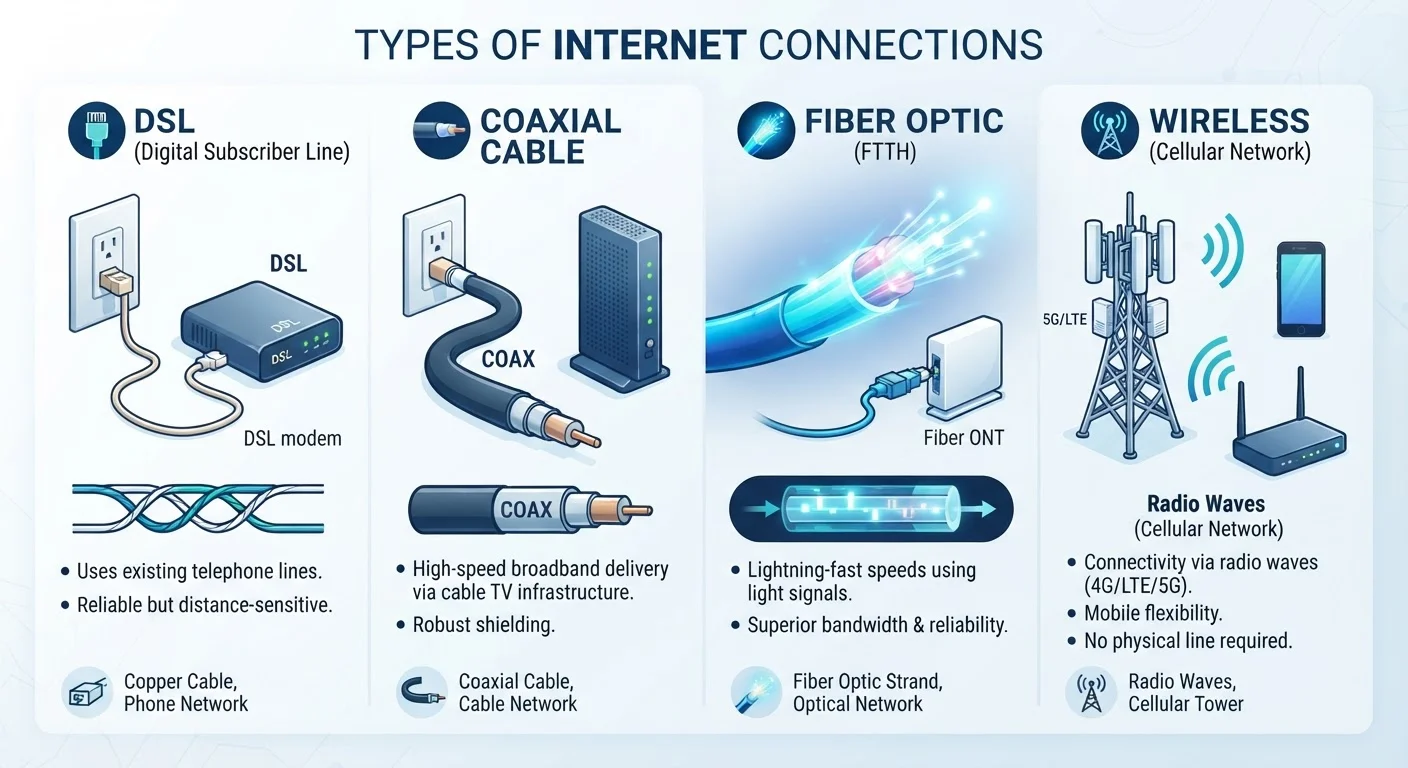
Photo: TrendingResults.net | Discover More, Trend More editorial
Key Takeaways
- DSL uses existing phone lines and is widely available but generally delivers slower speeds than cable or fiber.
- Cable internet is fast and widely deployed but shared bandwidth can cause slowdowns during peak hours.
- Fiber optic internet offers the most consistent speeds and equal upload/download performance, but availability is still limited.
- Fixed wireless delivers internet via radio signals from a tower - useful in rural areas but sensitive to distance and obstructions.
- Your connection type affects upload speeds and latency, not just how fast downloads feel.
Why Your Connection Type Matters More Than the Advertised Speed
When shopping for home internet, most people focus on one number: the download speed. But the technology delivering that speed shapes your everyday experience in ways a single megabit figure can't capture. Two households paying for identical advertised speeds - one on cable, one on fiber - may have very different experiences during a video call or a large upload.
Understanding the four main broadband types helps you read an ISP's offer accurately, anticipate limitations, and ask the right questions before signing a contract. For a deeper look at the equipment side of the equation, see our guide on modems, routers, and gateways.
25%
U.S. households lacking access to fiber broadband
According to FCC broadband deployment data, a significant share of American homes still cannot access fiber service regardless of willingness to pay.
~19M
Americans lacking access to fixed broadband
The FCC's broadband deployment reports estimate roughly 19 million Americans remain without access to any fixed broadband service meeting basic speed thresholds.
3-5x
Typical fiber upload advantage over cable
Fiber plans commonly offer symmetrical speeds, while cable upload tiers often reach only 20-35% of their advertised download rates.
DSL: Internet Over Your Phone Line
DSL (Digital Subscriber Line) transmits data over the same copper telephone wiring already running into most American homes. Because that infrastructure is nearly ubiquitous, DSL has historically been one of the most widely available broadband options - particularly in suburban and rural areas underserved by cable.
The tradeoff is distance sensitivity. DSL speeds degrade the farther your home sits from the provider's central office or distribution point. A household a few blocks away may get 50 Mbps while a home two miles out gets 10 Mbps or less. Upload speeds are also limited by the technology's asymmetrical design - meaning downloads are prioritized over uploads. For households that primarily stream video and browse, that asymmetry may go unnoticed. For remote workers or anyone on frequent video calls, it becomes a real constraint.
Cable: Fast Downloads, Shared Infrastructure
Cable internet travels over the same coaxial cable that delivers television signals. It's widely deployed across suburban America and capable of download speeds that rival fiber in many plans. For most households - especially those that stream heavily - cable is a practical and capable option.
The key architectural difference from fiber is that cable runs on a shared network segment. Neighbors in the same area share capacity on the local loop, which means speeds can dip noticeably during peak evening hours. Cable is also asymmetrical: upload speeds are typically a fraction of download speeds, a limitation that becomes apparent during video conferencing or cloud backups.
For a head-to-head look at how cable and fiber compare under real-world pressure, our article fiber vs. cable performance comparison goes deeper on latency and consistency.
Fiber Optic: Light-Speed Data Through Glass
Fiber optic internet transmits data as pulses of light through thin glass or plastic strands. Unlike copper-based technologies, fiber doesn't degrade with distance in the same way, isn't susceptible to electrical interference, and delivers symmetrical speeds - meaning upload rates match download rates. That symmetry matters for remote work, cloud storage, and video production workflows where outbound data is just as important as inbound.
Fiber also tends to be more consistent under load. Because most fiber deployments run dedicated connections from the provider's network to individual homes (a configuration called FTTH, or Fiber to the Home), you're not sharing bandwidth with neighbors the way cable customers do.
Verify Fiber Type Before Signing
The main limitation is availability. Fiber build-out requires significant infrastructure investment, and many areas - particularly rural counties - remain unserved. Checking your address against a provider's coverage map before making assumptions is essential.
Fixed Wireless: Broadband Without a Wire to Your Door
Fixed wireless access (FWA) delivers internet via radio signals from a tower to a receiver mounted on or near your home. It doesn't require running cable or fiber to your address, which makes it a viable option where wired infrastructure doesn't exist. Providers offering fixed wireless can expand coverage faster than those laying physical lines.
Performance depends on proximity to the transmission tower and line-of-sight conditions. Dense foliage, hills, and buildings between your home and the tower can reduce signal quality. In favorable conditions - a clear line of sight within a reasonable range - fixed wireless can deliver respectable speeds for everyday use. Weather interference is less of a factor than many assume, though it can occur in severe conditions.
Fixed wireless is distinct from mobile broadband (LTE or 5G home internet), which uses the same signals but through the cellular network. For an explanation of how those mobile standards work, see 5G, LTE, and Wi-Fi calling explained.
“Broadband infrastructure is not a luxury - it is the electricity of our time. Access to fast, reliable internet determines whether communities can participate in the modern economy.”
— Jessica Rosenworcel, Former FCC Chairwoman
Choosing Based on What's Actually Available
Technology preferences are useful, but availability is the real constraint for most households. Fiber is the gold standard for performance, but if it's not in your area, comparing cable against fixed wireless - or DSL against fixed wireless - becomes the actual decision. Check each provider's coverage map at your specific address, not just at the city or zip-code level, since coverage can vary block by block.
Once you know what's available, look past the advertised download speed. Ask about upload speeds, data caps, and whether the plan price increases after an introductory period. Our piece on common myths about internet speeds breaks down how ISP marketing language can obscure the real-world picture. For first-time subscribers, our end-to-end home internet guide covers the full process from connection types to contract terms.
Frequently Asked Questions
The content on this site is provided for informational purposes only and should not be considered a substitute for professional advice. While we strive to provide accurate and up-to-date information, we make no guarantees regarding its completeness or accuracy. Always consult a qualified professional for advice specific to your circumstances before making any decisions.